168 hours a week: where do they go?
Published on
Do you feel like you never have enough time? Like there are always more things to do than there is time for? Everyone has the same 168 hours a week. After the essentials, sleep, food and chores, there is still more than enough time left.
Why track your time?
It might seem like a burden, something difficult that takes a lot of energy, but tracking your time has many benefits. It actually does not take that much time. It feels difficult because seeing where you waste your time is mentally harder, and you start making conscious or unconscious choices about how to spend it.
Convinced? I have made a template that makes it easy to track your time throughout the week in half-hour intervals.
Templates or a notebook?
There are several templates you can use, both digital and printable. Personally, I find pen and paper easiest. A standard A5 notebook with about 20 lines will get you a long way.
It is very simple: when you start your working day, write the hour in the left column (09:00, for example), then divide the rest of the page into 30-minute blocks. I do this by putting :00 and :30 on the top line.
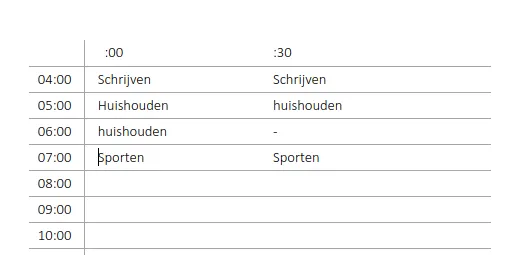
At the start of each hour, write down what you have done or what you are going to do. This also sets your intention for the next hour or half-hour.
Not a pen-and-paper person? You can also track it in Excel or Google Sheets. The advantage is that you can keep an entire week in a single sheet. At the end of the week, you can quickly see what went well and what did not.
To try it out, I would recommend a notebook or a printed template, so it stays on your mind.
Track your time in a way that works
I understand: keeping track of everything you do can seem like overkill. But give it a chance and you will find it is quite manageable. It offers plenty of benefits, and it is not much trouble if you keep your worksheet or notebook with you.
The trick is not to take it too seriously. Miss a day? No problem. Miss a few hours? No problem!
There is no right or wrong way to fill it in. It is a tool for becoming more aware of how you spend your time. If you struggle to work for a sustained stretch, for example, that could be a sign of something else: low energy, a post-lunch crash, and so on. That is where time tracking can help.
Choose your own level of detail too. It can be as simple as a project, a time block or a long-running task.
Interpret the results
Measuring gives you insight; adjusting your approach is even better.

The final step is to interpret the results. Are there lots of gaps in your schedule? Are you working under a lot of pressure or stress? These are all things you will start to see in your time log.
You can also see whether you actually did the things you said you would do at the start. If you did not, you need to sharpen your focus.
Another thing to look at is when you spend the most time working toward your goals. Perhaps you are incredibly productive in the morning but slow down in the afternoon. If this shows up in your schedule, you can account for it by planning the hardest tasks, those requiring the most thought, in the morning.
All these things emerge when you record your time in a schedule. It lets you improve next week on the things that did not go well this week.
Here are some questions you can ask yourself:
- Are there lots of gaps in your time log? Are you working under a lot of pressure or stress?
- Have you written down lots of peripheral tasks? Are your priorities or goals clear?
- Are you struggling to get started?
- Are the tasks on your master to-do list finished? Do you need to allocate your time differently?
Bonus: discover what you can track automatically
Why make it difficult when there is an easier way?

The advantage of recording things manually is that you become much more conscious of them. But it also creates a barrier, which can make it harder to start or keep going. You have to remember to bring your notebook or open your app.
Do not worry: if you find this difficult, there are automatic tools too. You can install them in your browser, on your phone and on your laptop.
One example is RescueTime. This app automatically tracks which programs you have open and which websites you visit.
Those websites and apps are then categorized as either productive or unproductive.
You automatically receive a report every week or month. You can immediately see how many hours you spent on Facebook and how long you had your text editor open.